🌍 HTTPS Access (SSL Proxy)
This page explains how to make applications on Trooper.AI GPU servers publicly reachable. You can publish dashboards, APIs, AI apps, model endpoints, and user interfaces running inside templates or your own projects.
Your GPU Server Blibs provide 10 to 40 public ports exposed to the internet. Any services bound to these ports will be accessible from outside the internal network using your server’s public hostname.
Trooper.AI provides two access paths:
1️⃣ Direct Raw Public Ports
Instant connectivity without setup.
2️⃣ 🔐 Secure HTTPS via Webproxy (Recommended)
Production-grade encrypted exposure for web apps and APIs. Active on all tempaltes by devault und for own apps use this: Web Proxy with SSL
🌐 Public Port Allocation
Every GPU server includes public TCP+UDP ports assigned automatically to templates and available for custom apps. UDP must be activated via management dashboard if really needed.
Raw direct URL:
http://connectXX.trooper.ai:PORT
Example dashboard view:
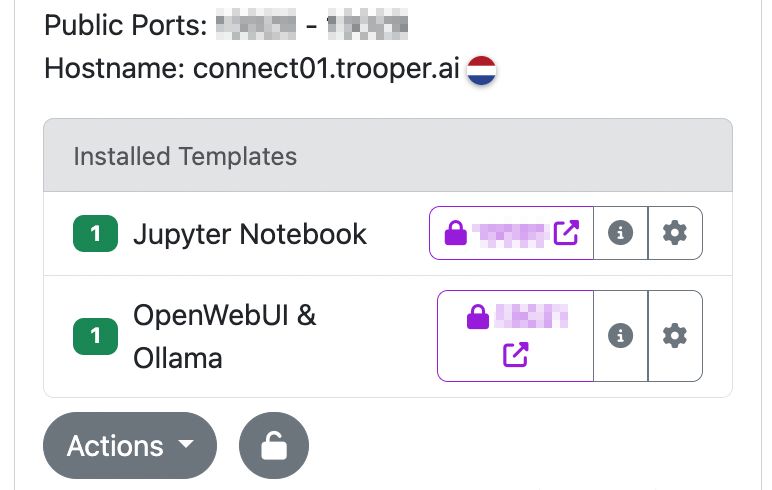
In this view:
- Public port ranges
- Public hostnames
- Template names
- Lock icon = secure HTTPS available
- Info = documentation link
- Settings = configuration
🤖 Port forwarding is an automated process with built-in checks. Please instruct your AI Agent to focus on port configuration and binding, as port forwarding is functioning correctly. No NAT issues are possible if your machine status is green.
🚀 Direct Raw Port Access (Quick Option)
Bind your application to 0.0.0.0 using any of the assigned public port:
Example Flask:
flask run --host=0.0.0.0 --port=11307
Example Gradio:
app.launch(server_name="0.0.0.0", server_port=11307)
Result:
http://connectXX.trooper.ai:11307
This approach remains available for fast testing and internal convenience. Raw ports are not encrypted; read more for HTTPS.
🔐 Secure HTTPS with Webproxy (Recommended)
For production, authentication, user interfaces, embeddings, monitoring dashboards, and API usage:
1️⃣ Run app internally on a safe internal port:
0.0.0.0:8080
2️⃣ Install the Webproxy Template
3️⃣ Configure:
- internal port → app port (e.g.
8080) - external Webproxy port → selected at install
4️⃣ Public HTTPS created:
https://<token>.secure.trooper.ai
📌 Advantages:
- automatic SSL certificates
- WebSocket support
- internal routing only (secure pathing)
- no nginx setup needed
- no local reverse proxies required
Each template includes a pre-configured, secure Webproxy and associated endpoint. To securely expose custom applications deployed on your GPU server, utilize the Webproxy template: Web Proxy with SSL
⚠️ Port 80 / 443 Usage
Direct binding to ports 80 or 443 is not automatically exposed to the public internet. Utilize the Webproxy template to establish HTTPS endpoints. Installing custom SSL certificates is not supported; we recommend using port 8080 for your application, a commonly preferred choice among developers.
Read more: Web Proxy with SSL
⏱️ Proxy Timeout Classes
The HTTPS/Webproxy routing layer automatically adjusts behaviour based on traffic type. This ensures short interactive calls stay fast, while AI/streaming jobs remain stable.
| Traffic Type | Detection Method | Timeout |
|---|---|---|
| Regular HTTP | standard request/response | 60s |
| Chat / Streaming (SSE/NDJSON) | /api/chat, /chat/completions, /api/generate, /generate, /stream, /events, or Accept: text/event-stream / NDJSON headers |
10 minutes |
| Large Downloads | file-like type, Range headers, attachments, binary transfer |
30 minutes |
| WebSockets | WS/WSS upgrade detection | no idle timeout |
💡 The proxy adjusts dynamically if response conditions change. Example: Serving a file = automatic upgrade to download timeout.
📝 Application Requirements
For SSE/NDJSON Streaming
Send correct content type:
text/event-streamapplication/x-ndjson
Include heartbeat output every 15–30s.
For WebSockets
Keep ping/pong active (20–30s typical).
For Downloads
Support Range requests and status 206.
Add Content-Disposition: attachment when needed.
🧪 Testing Stream Modes
Example SSE curl:
curl -N -H "Accept: text/event-stream" https://<ssl-id>.secure.trooper.ai/api/stream
Example NDJSON:
curl -N -H "Accept: application/x-ndjson" https://<ssl-id>.secure.trooper.ai/generate
Example resumable download:
curl -O -H "Range: bytes=0-" https://<ssl-id>.secure.trooper.ai/files/model.bin
🧪 Port Reachability Tests
Internal:
ss -tlnp | grep :11307
External:
curl http://connectXX.trooper.ai:11307
Raw ports only require:
- running app
- binding
0.0.0.0 - correct port usage
🔁 Public Ports & Templates
Public ports are assigned automatically and shown in the dashboard next to template installs.
For own projects, use:
8080→ Webproxy → HTTPS endpoint
🧯 Troubleshooting
Common issues encountered when establishing a fully functional HTTPS connection are often related to simple configuration details.
❌ Not reachable: check port & binding
❌ Wrong port: use assigned ports only
❌ No HTTPS: use Webproxy template
❌ Firewall inside container: disable or adjust
❌ UDP not activated: TCP is our default, activate UDP via the management dashboard if you really need UDP
❌ Long compute jobs: stream output or use SSE/NDJSON mode
❌ Trying to connect own domain: We do not support own domains.
🧑💻 Example: FastAPI with Webproxy
Internal app:
uvicorn.run("main:app", host="0.0.0.0", port=8080)
Public HTTPS:
https://<token>.secure.trooper.ai
Read more: Web Proxy with SSL