Web Proxy with SSL
Securing your connection to your GPU server is a key consideration for every developer. Ensuring your work is accessible while maintaining security is important as you develop the next big AI thing!
👮 For optimal security and scalability, do not expose this endpoint directly to public users. Implement a dedicated web server to manage user interactions, which will then communicate with your GPU server. This architecture adheres to best practices and industry standards.
Simple, Secure Exposure of an Internal Service to the Internet
This template provides a lightweight way for clients to expose an internal service (HTTP or WebSocket) to the public internet through the Trooper.AI router system. It automatically creates a secure HTTPS endpoint with a free SSL certificate, while forwarding traffic to any internal port on the client’s machine.
The goal is simplicity: install a small proxy, specify two ports, and instantly get a secure, externally reachable URL.
All traffic from the Webproxy’s SSL Endpoint to your machine’s public port is routed in our internal network, completely bypassing the internet. This is a significant security advantage of Trooper.AI.
Key Features
1. Public HTTPS Endpoint
Your internal service becomes available under a *.secure.trooper.ai subdomain, routed through the Trooper.AI infrastructure with automatic SSL certificates.
2. Full WebSocket Support
The template forwards both standard HTTP traffic and WebSocket connections without additional configuration.
3. Optional Password Protection
If a username and password are provided, the endpoint is secured with Basic Auth. Leaving both values empty disables authentication.
4. Clean and Minimal Setup
The configuration generates a dedicated proxy endpoint, listens on a chosen port, and forwards everything to your internal service.
How It Works
Inputs
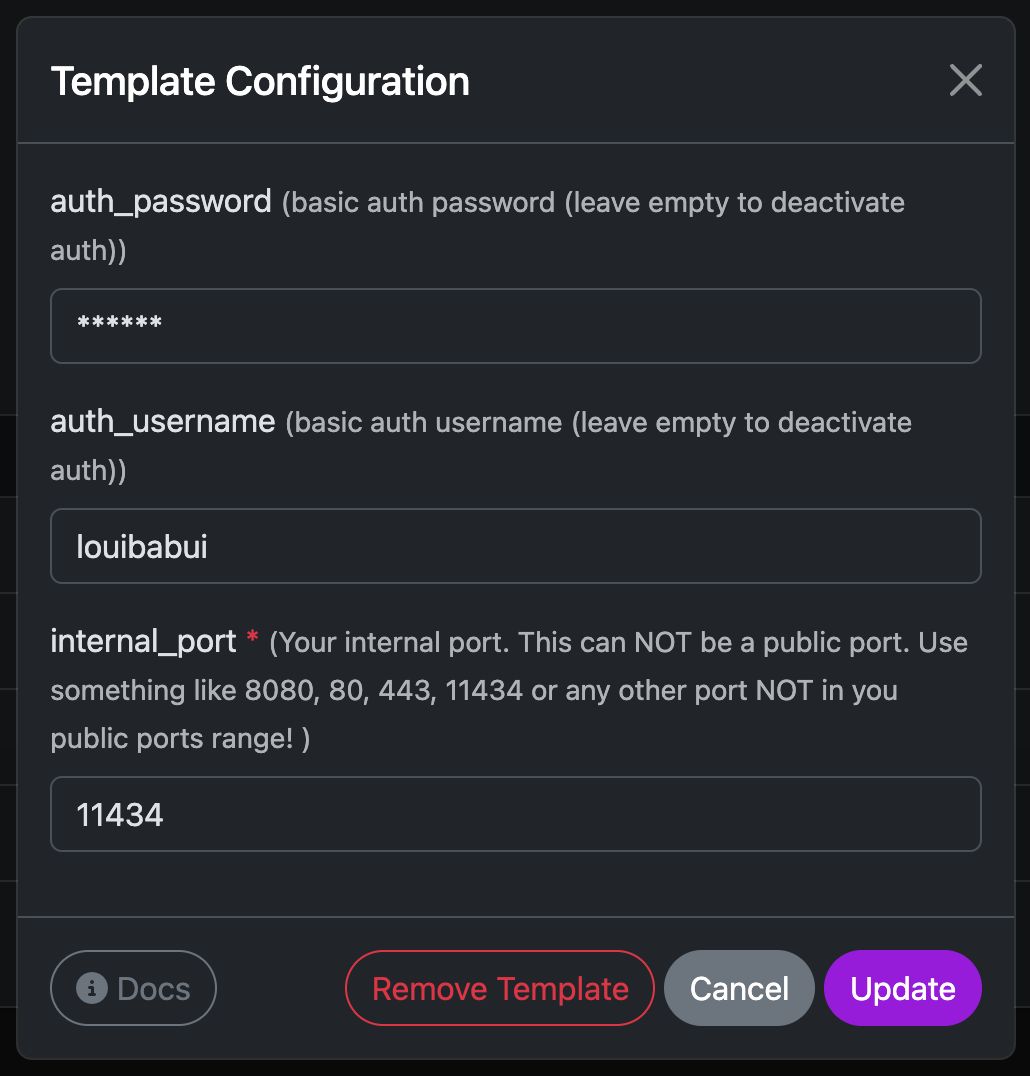
You only set template configuration before installation.
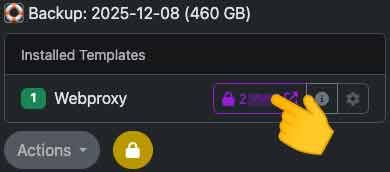
The external port will be assigned automatically and displayed next to the template name, just like with other templates.
🚨 Do not use port 443 and don’t provide a self sign certificate on your port!
Internal Flow
- Nginx is installed (including htpasswd support).
- If authentication is enabled, a password file is created.
- A proxy configuration is placed under
/etc/nginx/sites-available/trooperai-webproxy-<external_port> - The config forwards all incoming traffic to
http://127.0.0.1:<internal_port>. - WebSocket upgrade headers are automatically passed through.
- Nginx is reloaded and the endpoint becomes active.
Timeout classes
| Traffic type | How it’s detected | Proxy timeout |
|---|---|---|
| Regular HTTP request/response | Anything not matched below | 60s (DEFAULT) |
| Chat/Streaming (SSE / NDJSON) | Path contains /api/chat, /chat/completions, /api/generate, /generate, /stream, /events, or Accept: text/event-stream / application/x-ndjson |
10 min (LONG) |
| Large file downloads | Range header, file-like path/extension, Accept: application/octet-stream |
30 min (DOWNLOAD) |
| WebSockets | HTTP upgrade to WS/WSS | No proxy idle timeout |
The proxy also upgrades timeouts dynamically on the response (e.g., if your server sends
206orContent-Disposition: attachment, it bumps to the DOWNLOAD timeout even if the request wasn’t classified as a download initially).
Free SSL Certificate included
Once active, Trooper.AI’s router detects the exposed port, issues a free SSL certificate, and publishes your secure endpoint.
Example Result
Given a Trooper.AI-assigned domain such as:
myapp123-husky-delta.secure.trooper.ai
and a publicly available port within your configured range (e.g., 12345), with an internal service listening on port 8080,
the connection flow will be: 8080 -> 12345 -> https://myapp123-husky-delta.secure.trooper.ai.
This securely forwards traffic from the public HTTPS endpoint to your internal service.
Troubleshooting
We have compiled answers to common questions regarding the webproxy feature. For individual assistance, please contact our support team: Support Contacts.
Where to find my domain?
Ensure your internal service is running on the desired port, then install or update the webproxy template. The assigned domain and SSL activation status (indicated by a lock icon) will then be displayed.
Is my internal service HTTP or HTTPS?
That’s a valid question. Internally, your service operates as a standard HTTP service on a configurable port, such as 8080. This port remains internal to your server instance. The web proxy service installed via this template handles SSL encryption, automatically provisioning and managing the SSL certificate for secure external access. Essentially, this template establishes a secure HTTPS connection between your internal port and the public internet.
Existing Nginx Configurations
This template installs and configures Nginx to route internal traffic on your GPU server. While it will not override existing configurations, managing Nginx directly on your GPU server is generally not recommended due to potential complexity. Consider whether direct Nginx management is necessary for your workflow.